All ShowTkt features
The whole platform.
Every detail covered.
Ticketing, box office, audience relationships, and the business behind your stage. Explore the major features in one easy-to-read list.
The master feature list
Find what matters
to your team.
Explore the major capabilities by category. Each feature has a short explanation, so you can see where ShowTkt fits into your day.
Productions & seating
Your shows, your venues, every seat.
- Production management
Organize shows, artwork, descriptions, performance dates, and on-sale schedules.
- Venues & seating charts
Build interactive reserved-seat layouts for your venues.
- General admission
Sell by quantity with capacity controls for unreserved events.
- Flexible ticket pricing
Set ticket types, seating tiers, and individual seat prices.
- Seat reservations
Use temporary holds during shopping and checkout.
- Seat-view photos
Help guests picture their view from selected areas of the house.
Checkout & payments
Flexible ways to buy and pay.
- Guest checkout
Let customers buy tickets without creating an account.
- Online card payments
Accept payments through your configured Stripe integration.
- Clear order totals
Show ticket prices, ticketing fees, taxes, and discounts.
- Promotions & discount codes
Create offers with eligibility rules and usage limits.
- Flexible staff payments
Record cash, check, and external-card payments at the box office.
- Partial payments & balances
Track amounts paid and the remaining order balance.
Box office & order care
Tools for the people behind the counter.
- Staff selling workspace
Find performances, select tickets, and complete assisted sales.
- Order search & history
Find purchases and review their tickets and payment records.
- Order modifications
Adjust eligible orders and settle any price differences.
- Seat & performance exchanges
Help guests move eligible tickets under your exchange policy.
- Cancellations & refunds
Manage eligible cancellations and refunds with recorded payment history.
- Ticket delivery & downloads
Send ticket links and download E-Tickets when needed.
Mobile tickets & admission
From a phone screen to the front door.
- Mobile ticket pages
Give guests easy access to their tickets and QR codes on a phone.
- Print-at-home E-Tickets
Make PDF tickets available for download.
- QR scanning & lookup
Validate tickets, find guests, and review entry and exit status.
- Native mobile scanner
Support configured offline scanning with compatible devices and setup.
- Wallet integrations
Apple Wallet where configured; Google Wallet requires separate activation and approval.
- Thermal ticket printing
Connect supported printing, including BOCA, with workstation and stock setup.
Wallet, native scanning, and physical printing require deployment setup and provider or device acceptance.
Season packages & renewals
Make one great evening a whole season.
- Season packages
Group productions into reserved-seat packages with package pricing.
- Performance choices
Define the shows and performance options included in a package.
- Subscriber renewals
Invite eligible package holders to return for the next season.
- Protected renewal seats
Hold eligible subscriber seats through defined renewal deadlines.
- Renewal communication
Connect renewal invitations and reminders with customer email campaigns.
Customer relationships
A connected view of your audience.
- Producer-owned profiles
Keep your customer records scoped to your organization.
- Purchase & giving history
Help authorized staff understand each customer’s relationship with your venue.
- Customer accounts
Let customers review their purchases, payments, and current tickets.
- Email-link sign-in
Give customers access through secure, time-limited email links.
- Self-service exchanges
Let eligible guests exchange tickets with policy, fee, and balance review.
- Communication preferences
Keep track of marketing consent and customer preferences.
Website & audience email
Keep your brand and your audience connected.
- Branded public catalog
Showcase productions, artwork, descriptions, and performance calendars.
- Producer website Pages
Prepare and publish controlled page content for an integrated producer website.
- Customer email campaigns
Create bulk messages and schedule eligible audience communications.
- Email templates & previews
Prepare campaign content and review it before sending.
- Order & ticket messages
Share confirmations, order details, and links to released tickets.
- Delivery & engagement tracking
Review campaign delivery and available audience engagement signals.
Website Pages require frontend integration. Marketing email follows consent and campaign eligibility.
Gifts & giving
More ways to support your stage.
- Gift certificates
Sell gifts customers can apply toward eligible purchases.
- Gift balances & history
Track issuance, redemption, and remaining value.
- Box-office credits
Manage eligible staff-issued credits and customer delivery.
- Checkout donations
Invite customers to add a one-time contribution to their purchase.
- Donation campaigns
Create dedicated giving campaigns with goals and acknowledgements.
Giving supports one-time contributions.
Reporting & team access
Understand the business. Equip your team.
- Sales & performance reporting
Review ticket sales and production performance.
- Payments & refunds
Track receipts, balances, and refunds against recorded payments.
- Discount & giving reports
Understand promotion usage and contribution activity.
- Filters & exports
Narrow report results and export data for your team.
- Staff security profiles
Give each team member the permissions their role needs.
- Audit history
Review recorded administrative actions with controlled access.
Ownership & hosting
A business model that fits your organization.
- One-time software purchase
Buy ShowTkt and run it on servers your team maintains.
- Retain your ticketing fees
Create an additional revenue stream with self-hosted ownership.
- Optional server setup
Pay ShowTkt an additional one-time fee to set up your servers.
- Ongoing help when needed
Arrange future feature changes and maintenance for additional fees.
- ShowTkt-managed hosting
Let ShowTkt host everything, with ticketing fees that can pass to purchasers.
Your configuration and service scope are confirmed during onboarding. Compare ownership & hosting options or request a walkthrough of the features your team needs.
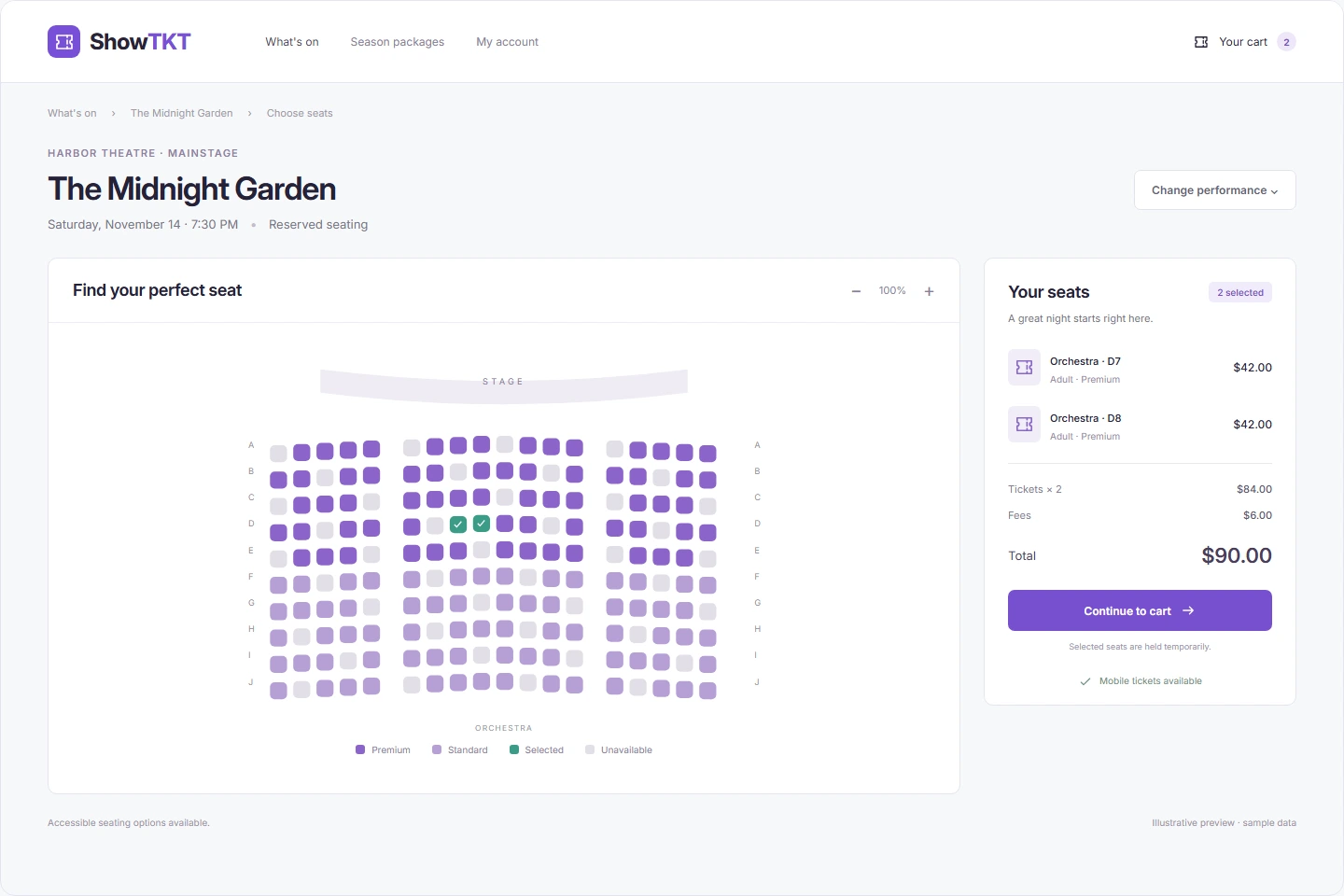
A representative look at ShowTkt. Preview layouts and figures are illustrative; your configuration may vary. Select the image to explore it at full size.
Your next great performance starts here
Let’s set the stage
for your next chapter.
Tell us about your venue. We’ll help you find your fit.